

Your Documents. Your AI.Your Privacy.
Search, understand and analyze your documents using private, offline AI. Get answers backed by verifiable evidence.
Version 0.1.0 beta · Windows 11 x64 · macOS · Linux x86_64 · Free to start
- Local processing
- No uploads
- Clickable evidence
- Windows, macOS + Linux
What are the termination conditions in this contract?
The agreement permits termination with 30 days’ written notice, subject to the conditions in Section 8, which require any unpaid fees to be settled first.
Contract.pdf · Page 12
Contract.pdf · Page 12
EVIDENCE 1
Contract.pdf
Page 12 · Section 8.2 Termination
8.1 This Agreement remains in force until terminated in accordance with this Section 8. 8.2 Either party may terminate this Agreement by giving thirty (30) days’ written notice to the other party, subject to clause 8.3.
See Pramvex at work
Screenshots of Pramvex 0.1.0 on a set of sample documents. The demo above is interactive; these are taken straight from the desktop app.
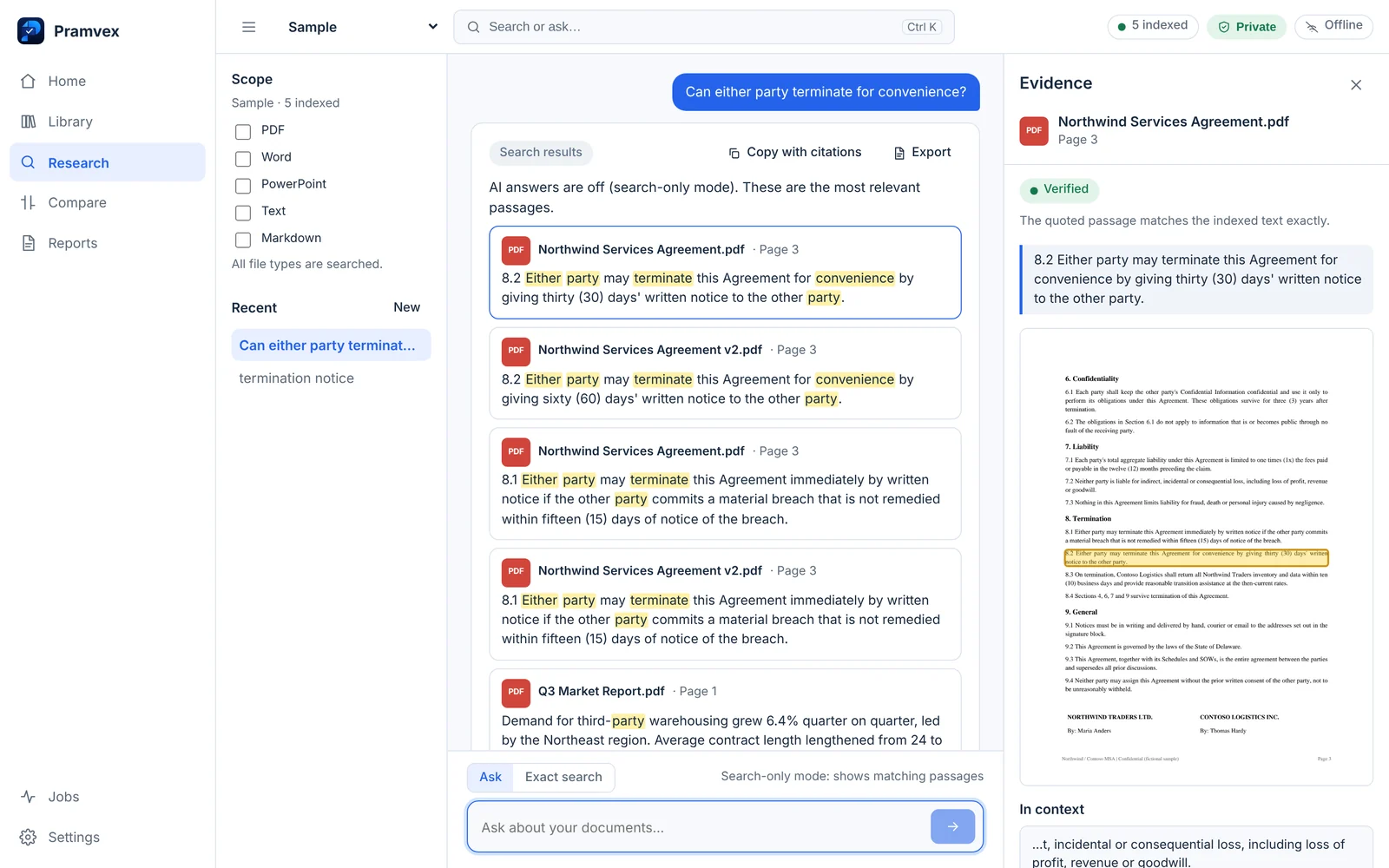
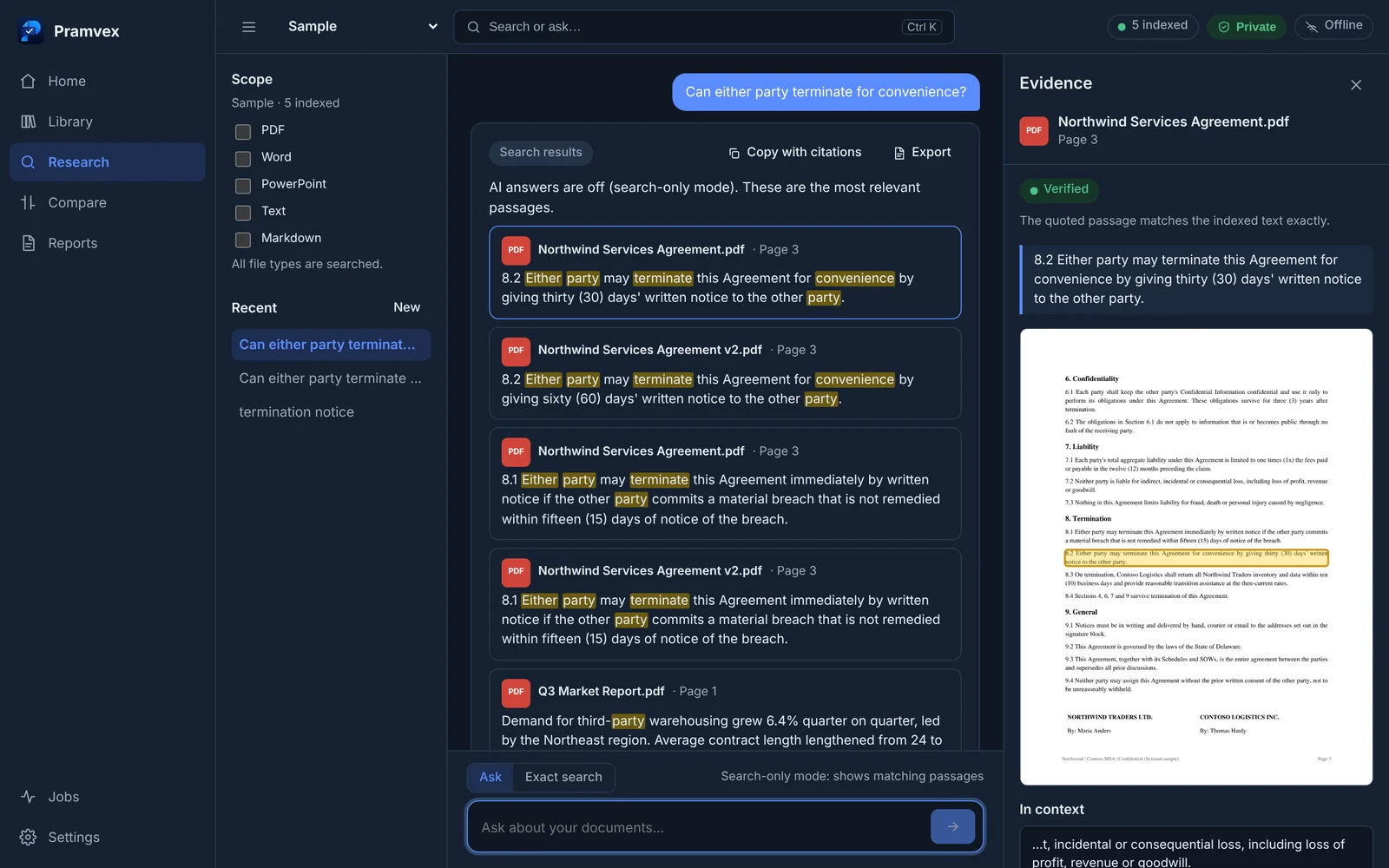
Three steps from a folder to a verified answer
Search-only mode needs no AI model at all. Add a local model when you want written answers. Read the full walkthrough.
- Step 1
Select a folder
Point Pramvex at a folder of PDFs, Word, PowerPoint, text or Markdown files. It reads and indexes them on your computer; scanned pages go through on-device OCR.
- Step 2
Search or ask
Use Exact search for a phrase, a count or a list of files. No model needed. Or ask a question in plain language and a local AI model writes an answer from your documents.
- Step 3
Open the original evidence
Each claim carries a citation. Click it to see the highlighted passage and open the original file at that page, then decide for yourself.
Built for checking, not just chatting
Pramvex isn’t a generic “chat with your PDF” tool. It is built around inspecting the evidence behind each claim.
Private AI
Your documents stay on your computer. Open AI models run locally through llama.cpp, downloaded only when you choose.
Learn more about Private AISmart document search
Find information across hundreds of files: exact phrases, counts and file lists without any model, plus meaning-based search.
Learn more about Smart document searchEvidence Mode
Verify every answer against the original passage. Click a citation to open the source file at the right page.
Learn more about Evidence ModeDocument comparison
See what changed between two documents or versions, with citations to both sides, or compare them topic by topic.
Learn more about Document comparisonOCR & file support
Work with PDF, Word, PowerPoint, text and Markdown. Scanned PDFs are read on the device, so they become searchable too.
Learn more about OCR & file support
Your files stay on your device
Indexing, search, OCR and AI answers run locally. A few things do need the internet, and we list them here. How Pramvex handles data.
Inside your computer
- Your filesPDF, Word, PowerPoint, text
- Local indexSearch + embeddings on disk
- Local AIModel runs on your computer
- Evidence-backed answerEvery claim cited
On your computer
- Your documents
- Search index
- Embeddings
- AI model (llama.cpp)
- Conversations & reports
Never uploaded. Works with the network unplugged.
Separate, optional online services
- Installer downloadOnce, from this site
- Model downloadOnly when you click Download
- Licence activationPro only, when launched: key + device ID
- Update checksOff unless you turn them on
Pramvex and typical cloud document AI
Where Pramvex differs from the usual “upload your PDF to a chatbot” approach.
| Capability | Pramvex | Typical cloud document AI |
|---|---|---|
| Local document processing | Yes | Often unavailable |
| Works without internet | Yes, after setup | Usually requires internet |
| Source citations you can open | Yes, every claim | Varies |
| Search without an AI model | Yes | Varies |
| Document uploads required | No | Usually required |
| Pricing | One-time Pro licence (planned) | Often a subscription |
A general comparison, not a review of any specific product. Capabilities of individual services vary.
For people whose work lives in documents
Consultants & analysts
Find the figure or commitment buried in last year’s deliverables, and show the client exactly where it came from.
Auditors & accountants
Trace a number back to the page it appears on, and list every file that mentions a term. The counts are deterministic.
Researchers
Ask across a folder of papers and reports, then read the cited excerpt in context before you quote it.
Pramvex helps you find and check sources. It is not a substitute for professional review. More use cases.
Free to start. Pay once if you need more.
No subscription, no account for the free version. Pricing details.
Pramvex Free
0 forever
For trying Pramvex on a real project.
- Up to 25 documents
- Local document indexing
- Exact search, counts and file lists
- Meaning-based search when the search model is installed
- Basic evidence navigation
- No account, works offline
Pramvex Pro, Lifetime
Coming soon€69 one time, proposed launch price
For people who work across large document collections.
- Everything in Free
- Unlimited documents, subject to your computer’s resources
- Local AI answers with Evidence Mode
- Document comparison
- OCR for scanned PDFs
- Report export (PDF and Markdown)
- One-time payment, no subscription
Plans, price, taxes and whether Lifetime covers future major versions will be confirmed before launch.
Questions people ask first
Does Pramvex work offline?
Yes. Indexing, search, OCR and AI answers all run on your computer. You need the internet to download the app, to download an AI model if you want one, and (once Pro launches) to activate a licence. Update checks are off unless you turn them on. Your documents are never uploaded.
Do I need an AI model?
No. Without a model Pramvex runs in search-only mode: exact search, keyword passages, counts and file lists all work. Add a local model from Settings › Models when you want written answers.
How much memory (RAM) do I need?
Search-only mode runs on any supported computer. For AI answers, Pramvex recommends a model sized to your memory: a smaller model under 16 GB, a 7-billion-parameter model for 16–32 GB, and larger models as an advanced option on 48 GB or more. Final minimums will be published with the first public release.
Which models does it use?
Openly licensed models run through llama.cpp, such as Phi-4-mini (MIT) and Qwen2.5 (Apache-2.0), plus Nomic Embed v1.5 (Apache-2.0) for meaning-based search. Every download is checked against a published SHA-256.
Which file types are supported?
PDF (including scanned PDFs, through on-device OCR), Word (.docx), PowerPoint (.pptx), plain text and Markdown.
Which operating systems are supported?
Windows 11 on x64, macOS on Apple Silicon (M1 or later) or Intel, and 64-bit Linux with WebKitGTK 4.1 (Ubuntu 22.04+, Debian 12+, Fedora 38+ or equivalent) as an AppImage, .deb or .rpm. All installers are offered on the download page whatever device you visit from.
Find the answer. Verify the evidence. Keep your files private.
Free to start. No account, no upload, no subscription.